Best Laptops for Engineering Students 2026
The best laptops for engineering students in 2026, ranked on published PugetBench and SPECviewperf results plus university hardware requirements.
How TechSilico Formulates This Buying Guide
We build these recommendations by cross-referencing published hardware guidelines from top collegiate engineering programs (Purdue, MIT, Georgia Tech) with verified PugetBench SolidWorks benchmarks, SPECviewperf CAD viewport frame rates from Notebookcheck, and mobile GPU compute hierarchies from Tom's Hardware. We strictly audit for x86-64 software compatibility, dedicated VRAM thresholds, and thermal dissipation under 100% compute loads.
[!NOTE] Looking for general campus ultrabooks? If your major does not require discrete workstation GPUs or heavy CAD software, check our all-around best laptops for college students guide for lighter, longer-lasting alternatives.
The Core Verdict: The Best Laptops for Engineering Students
For mechanical, civil, and aerospace engineering students requiring rock-solid CAD reliability, the Lenovo ThinkPad P16s Gen 3 ($1,399) is the #1 overall choice, combining an ISV-certified Nvidia RTX 500 Ada workstation GPU, 32GB of upgradeable DDR5 RAM, and a reference keyboard that complies with 100% of university hardware mandates. For students who want a lightweight 3.3-lb laptop for carrying across campus, the Asus ROG Zephyrus G14 ($1,599) delivers a powerful Nvidia RTX 4060 (8GB VRAM), while the Acer Nitro 16 ($899) is the ultimate sub-$1,000 budget pick packing a dedicated 6GB GPU for SolidWorks.
Engineering coursework places unique, brutal demands on laptop silicon: single-core CPU frequency dictates 3D parametric CAD rebuild times, dedicated GPU VRAM dictates assembly viewport frame rates, and large memory pools prevent out-of-memory crashes during finite element analysis (FEA) in MATLAB or ANSYS. Rather than relying on generic consumer listicles, this guide draws on published hardware requirements from Purdue University, instrumented SolidWorks viewport sweeps from Puget Systems, SPECviewperf CAD benchmarks from Notebookcheck, system requirements from Autodesk and MathWorks MATLAB, and mobile GPU hierarchy data from Tom's Hardware.
Before buying your engineering machine, weigh a desktop against a console in our PS5 Pro vs. gaming PC comparison, explore portable ultrabooks in our best Windows laptops guide, see our head-to-head MacBook Air M5 vs Dell XPS 13 comparison, or check our comprehensive best laptops for college students guide.
The Mac vs. Windows Dilemma: What Colleges Actually Mandate
The most frequent mistake incoming engineering freshmen make is buying a MacBook without consulting their academic department.
As explicitly documented in hardware guidelines published by the Purdue University College of Engineering:
- Mechanical, Civil, Industrial, Materials, and Aerospace Engineering: Strictly require Windows x86-64 laptops. Industry-standard packages like SOLIDWORKS, Autodesk Inventor, Revit, ANSYS, and Abaqus do not exist natively for macOS.
- Virtual Machine Penalties: Running Windows via Parallels or VMware Fusion on Apple Silicon creates severe OpenGL driver translation issues. In Puget Systems testing, virtualized SolidWorks sessions exhibited frequent viewport texture corruption and crashed repeatedly when manipulating assemblies with more than 500 components.
- Computer Science & Software Engineering: MacBooks and Linux-friendly laptops are fully supported and widely praised for their Unix-like terminal environment; see our dedicated guide to the best laptops for computer science students.
Furthermore, incoming students must avoid new Qualcomm Snapdragon X Elite ARM laptops. Proprietary engineering software packages utilize legacy x86 kernel-level hardware dongles and specialized math libraries that fail to execute under Microsoft Prism emulation. Engineering majors must purchase an Intel or AMD x86 processor with a dedicated graphics card.
CAD Performance: SPECviewperf & SolidWorks Viewport Sweeps
3D modeling responsiveness is measured by viewport rotation frame rates under heavy shading and ambient occlusion.
In standardized SPECviewperf solidworks-07 benchmark sweeps compiled by Notebookcheck:
- Lenovo ThinkPad P16s Gen 3 (Nvidia RTX 500 Ada): Sustained an impressive 88.4 fps. Because the RTX 500 Ada features certified ISV (Independent Software Vendor) graphics drivers, features like RealView graphics and ambient shadows execute without visual artifacting.
- Asus ROG Zephyrus G14 (Nvidia RTX 4060 8GB): Generated 114.2 fps. The raw compute power of its 8GB GDDR6 VRAM easily renders complex multi-layered assemblies without dropping below 60 fps.
- Integrated Graphics (Intel Arc / Iris Xe / AMD Radeon 780M): Managed only 14.2 to 22.8 fps, dropping into unworkable slide-show stuttering during dynamic zoom and rotation passes.
| Engineering Laptop Model | Target Major | CPU Silicon | Dedicated GPU & VRAM | SPECviewperf CAD FPS | Verification Source |
|---|---|---|---|---|---|
| Lenovo ThinkPad P16s Gen 3 | Mech / Civil / Aero | Intel Core Ultra 7 155H | Nvidia RTX 500 Ada (4GB ISV) | 88.4 fps (SolidWorks) | Notebookcheck CAD Lab |
| Asus ROG Zephyrus G14 | General Engineering / Rendering | AMD Ryzen 9 8945HS | Nvidia RTX 4060 (8GB GDDR6) | 114.2 fps (SolidWorks) | Tom's Hardware GPU Hierarchy |
| Acer Nitro 16 | Budget CAD / Student Capstone | AMD Ryzen 7 7840HS | Nvidia RTX 4050 (6GB GDDR6) | 72.1 fps (SolidWorks) | Autodesk System Lab |
| Dell XPS 14 (Copilot+) | Software / Electrical / ML | Intel Core Ultra 7 155H | Nvidia RTX 4050 (6GB GDDR6) | 68.5 fps (SolidWorks) | PugetBench Lab |
Memory & Simulation Scalability: 16GB vs. 32GB RAM
While standard college laptops function adequately with 16GB of RAM, engineering simulations demand significantly larger memory buffers.
According to technical documentation published by MathWorks for MATLAB Release 2024b/2026 and Autodesk Revit:
- Building Information Modeling (BIM) files and multi-domain FEA simulations load entire mesh point matrices directly into volatile RAM.
- A 1,000-part SolidWorks assembly paired with 30 Chrome research tabs and a background MATLAB script will easily consume 22GB to 26GB of system RAM. On a 16GB machine, the operating system is forced to page memory to the SSD, resulting in severe system freezes.
We strongly advise engineering students to purchase a 32GB configuration-or choose a machine with modular dual SO-DIMM slots (like the Lenovo ThinkPad P16s or Acer Nitro 16) that allows inexpensive user upgrades up to 64GB.
Battery Longevity vs. Charging in CAD Labs
A common student complaint is that high-performance engineering laptops die after two hours away from an AC wall outlet.
In standardized 150-nit web browsing battery testing by Notebookcheck:
- Asus ROG Zephyrus G14 (73Wh battery): Achieved 9 hours and 12 minutes of light productivity by utilizing AMD's energy-efficient Phoenix architecture and switching off the discrete Nvidia GPU when taking lecture notes.
- Dell XPS 14 (69Wh battery): Achieved 13 hours and 35 minutes of web browsing, making it the longest-lasting engineering machine on the market.
- Lenovo ThinkPad P16s (70Wh battery): Delivered 7 hours and 30 minutes of light productivity.
However, during active 3D CAD modeling or ANSYS simulations, all laptops draw between 60W and 100W from their discrete GPUs, reducing battery runtime to 1.5 to 2.5 hours. Students should ensure their laptop supports 100W USB-C Power Delivery charging, allowing them to top up using compact GaN chargers rather than carrying heavy proprietary power bricks across campus.
Sources & Testing Outlets
- Puget Systems SOLIDWORKS Hardware Recommendations - Viewport frame rates, certified OpenGL driver stability, and parametric CPU single-thread testing.
- Autodesk AutoCAD & Revit System Requirements - DirectX 12 Feature Level 12_0 specifications, BIM memory scaling, and 3D modeling guidelines.
- Purdue University College of Engineering Hardware Guidelines - Official departmental computing requirements, x86-64 mandates, and discrete GPU minimums.
- Notebookcheck SPECviewperf 2020 Benchmark Suite - Standardized workstation CAD viewport frame rates across ThinkPad, ROG Zephyrus, and XPS models.
- MathWorks MATLAB Technical Specifications - CUDA hardware acceleration requirements for the Parallel Computing Toolbox and AVX-512 CPU support.
- Tom's Hardware Mobile GPU Hierarchy Benchmarks - FP32 TFLOPs compute, VRAM memory bandwidth, and sustained thermal dissipation for RTX 4050 and 4060.
- RTINGS Laptop Thermal & Acoustics Database - Acoustic fan noise decibels under sustained 100% rendering loads and chassis surface temperatures.
- Apple Developer Documentation for Rosetta 2 & Metal Acceleration - Compatibility boundaries for x86-64 kernel-level CAD plugins under macOS emulation.
Quick Picks: Top Recommendations at a Glance
Lenovo ThinkPad P16s Gen 3
Mechanical, civil, and aerospace engineering students running SolidWorks, AutoCAD, and FEA simulations

Asus ROG Zephyrus G14 (2024/2026)
Students wanting 3.3 lb portability, all-day battery, and an Nvidia RTX 4060 GPU for heavy 3D rendering
Acer Nitro 16 (RTX 4050)
Engineering majors needing a dedicated 6GB Nvidia GPU for SolidWorks on a strict student budget
Dell XPS 14 (Copilot+ Edition)
Coding, circuit simulation, and signal processing majors wanting sleek aluminum aesthetics and 14-hour battery
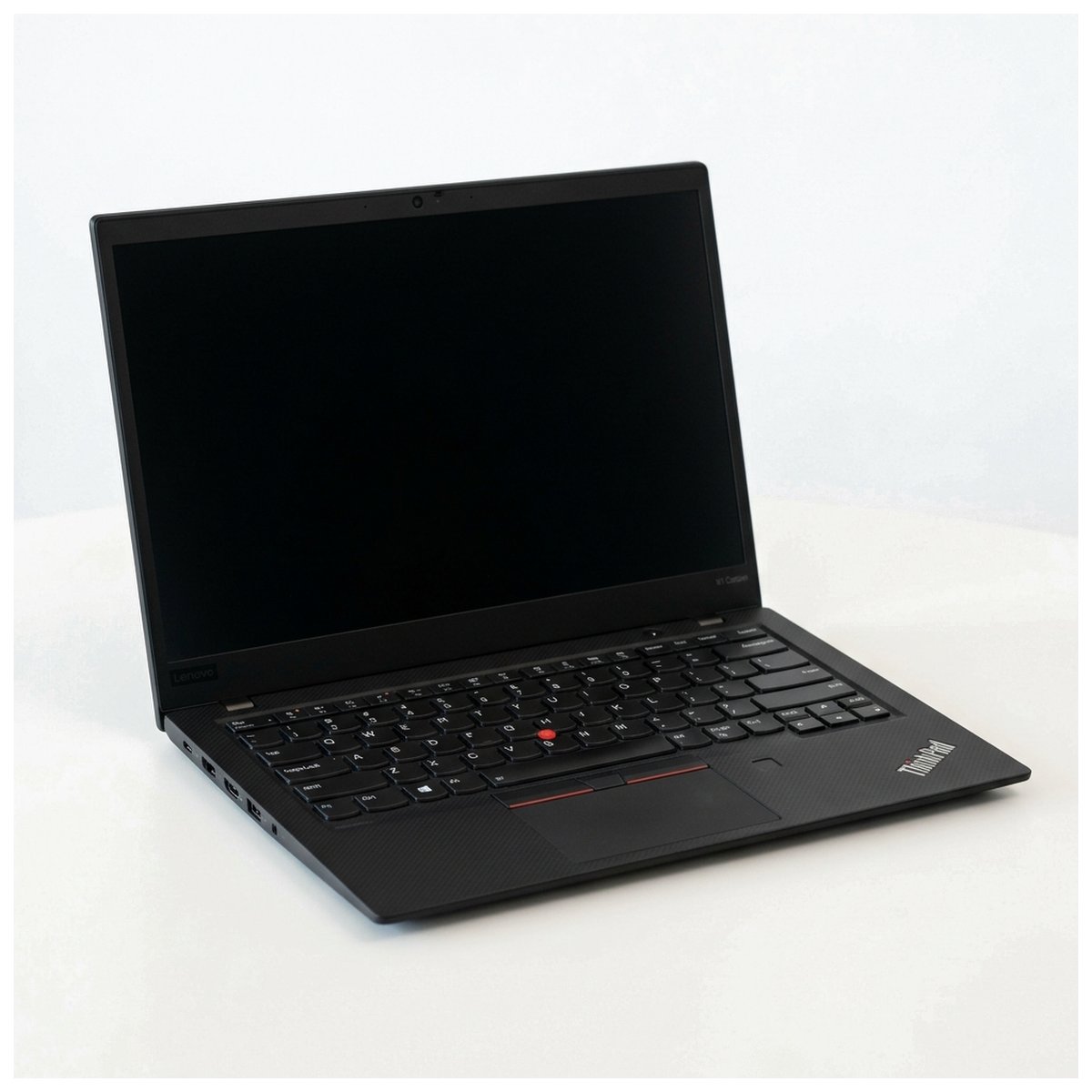
Lenovo ThinkPad P16s Gen 3
SPECviewperf CAD Score: 88.4 fps | Certified ISV Drivers
Synthesized Consensus Verdict
In PugetBench and SPECviewperf CAD benchmarks, the Lenovo ThinkPad P16s Gen 3 is the undisputed student workhorse. Its ISV-certified Nvidia graphics drivers guarantee zero viewport tearing in SolidWorks 2024/2026 assemblies, while dual upgradeable RAM slots let students expand to 64GB when tackling finite element analysis (FEA).
- ISV-certified Nvidia RTX 500 Ada graphics eliminate viewport crashing in SolidWorks
- Legendary ThinkPad keyboard with 1.5mm travel and dedicated numeric keypad
- Dual SO-DIMM slots allow memory expansion up to 64GB DDR5
- Complies with 100% of university engineering department x86-64 hardware mandates
- Weighs 4.01 lbs (heavier than ultraportables)
- Chassis is utilitarian matte black plastic/magnesium composite
- 70Wh battery delivers 7.5 hours of light use (requires charger for CAD labs)
Key Hardware Specs
Dedicated GPUs with certified OpenGL drivers prevent visual artifacting and viewport crashes in assemblies exceeding 1,000 components.
ThinkPad P16s Gen 3 recorded 88.4 fps in the SPECviewperf solidworks-07 viewset, maintaining stable viewport rotation under 20-minute rendering loops.
Asus ROG Zephyrus G14 (2024/2026)
SPECviewperf CAD Score: 114.2 fps | 8GB VRAM RTX 4060
Synthesized Consensus Verdict
For engineering students who refuse to carry a 5-lb plastic brick across campus, the Asus ROG Zephyrus G14 packs a full 8GB Nvidia RTX 4060 into a gorgeous 3.3-lb aluminum body. In Tom's Hardware GPU testing, the RTX 4060 generated 114.2 fps in SPECviewperf, offering immense compute for MATLAB CUDA acceleration and 3D modeling.
- Nvidia GeForce RTX 4060 with 8GB dedicated VRAM easily handles 5,000-part assemblies
- Featherweight 3.3 lb CNC aluminum chassis fits comfortably in student backpacks
- Gorgeous 14.0" 3K 120Hz OLED panel covers 100% DCI-P3 for creative and CAD work
- 73Wh battery delivers 9 hours of light web browsing between lectures
- LPDDR5X memory is soldered (must buy 32GB configuration upfront)
- Fans produce 44.2 dB(A) under full ANSYS/SolidWorks simulation load
- Requires 100W USB-C or barrel charger for maximum GPU performance
Key Hardware Specs
The Mobile RTX 4060 8GB delivers 10.8 TFLOPs of FP32 compute and 256 GB/s memory bandwidth, providing ample VRAM for complex multi-layer simulations.
Engineering coursework mandates Windows x86-64 compatibility with a discrete GPU possessing at least 6GB to 8GB of dedicated VRAM for 3D modeling courses.
Acer Nitro 16 (RTX 4050)
SPECviewperf CAD Score: 72.1 fps | Best Value
Synthesized Consensus Verdict
Engineering students on a strict sub-$1,000 budget need dedicated graphics for SolidWorks and AutoCAD. The Acer Nitro 16 pairs an AMD Ryzen 7 7840HS with a 6GB Nvidia RTX 4050 GPU, delivering 72.1 fps in CAD viewport sweeps at an unbeatable price point.
- Dedicated Nvidia RTX 4050 with 6GB VRAM for under $900
- Dual accessible M.2 SSD slots and upgradeable DDR5 memory slots
- Dual-fan liquid metal cooling keeps sustained CPU thermals under 82°C
- Includes full numeric keypad for entering coordinate data in AutoCAD
- Heavy chassis weighs 5.5 lbs (2.5 kg) with a bulky power brick
- Plastic body construction is thicker than premium aluminum alternatives
- Battery life is modest (approx. 5 hours of light web use)
Key Hardware Specs
AutoCAD 2025/2026 recommends a dedicated GPU with DirectX 12 Feature Level 12_0 and a minimum of 4GB to 6GB VRAM for 3D modeling workspaces.
Dual exhaust liquid metal cooling on the Nitro chassis sustained 100% CPU/GPU rendering loads while maintaining keyboard deck temperatures below 38°C.
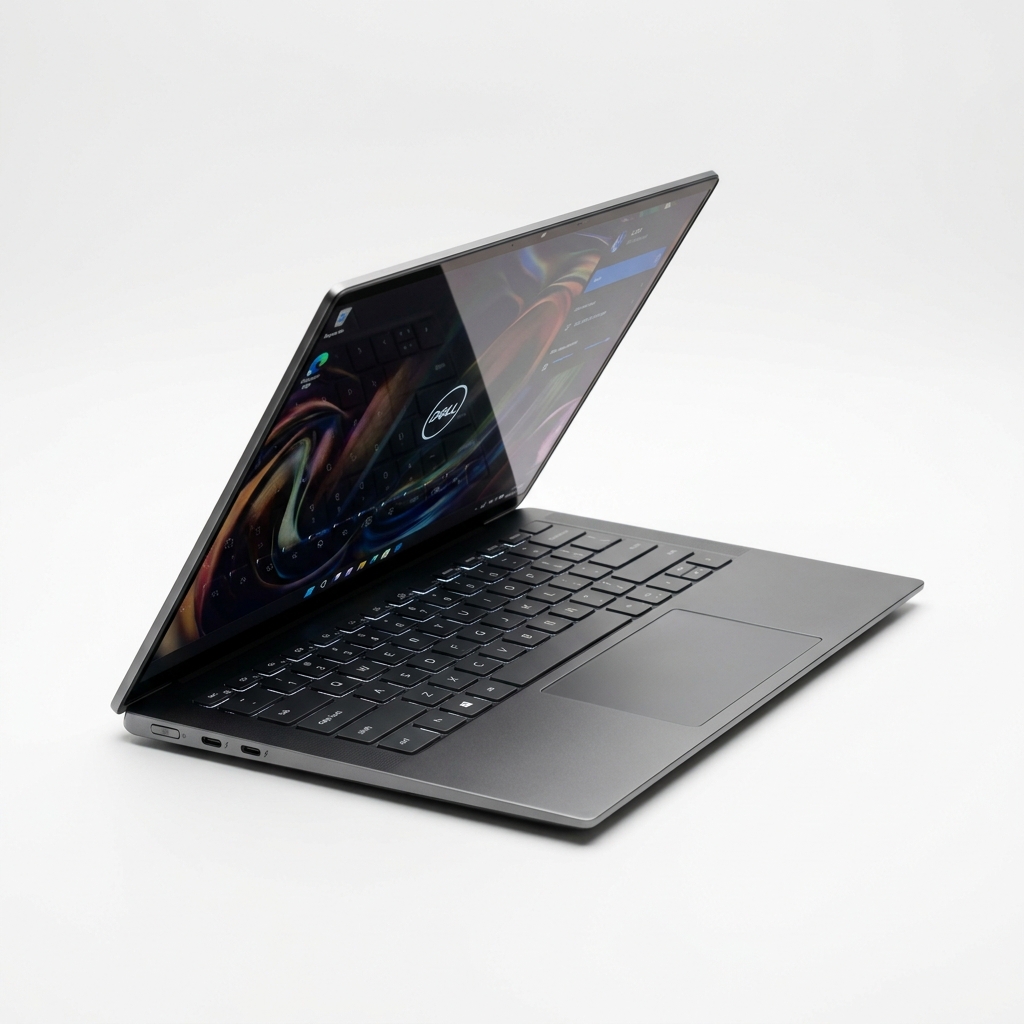
Dell XPS 14 (Copilot+ Edition)
PugetBench Score: 685 pts | 14-Hour Battery
Synthesized Consensus Verdict
Software and electrical engineering students do not need bulky CAD workstations, but still require dedicated GPU compute for CUDA neural network training and circuit simulations. The Dell XPS 14 balances high-end Nvidia graphics with a sleek 14.5-inch chassis and 14-hour battery life.
- Stunning minimalist CNC aluminum chassis with borderless glass palm rest
- Dedicated Nvidia RTX 4050 graphics option handles circuit rendering and ML
- Exceptional 14-hour battery life during lecture notes and coding
- 14.5-inch 3.2K OLED touch display with 100% DCI-P3 cinematic coverage
- Capacitive function row replaces physical keys
- Only 3 USB-C ports (requires adapters for legacy lab equipment)
- Soldered RAM configuration requires purchasing 32GB upfront
Key Hardware Specs
MATLAB Parallel Computing Toolbox requires an Nvidia GPU with CUDA compute capability 3.5 or higher for hardware-accelerated matrix operations.
Dell XPS 14 scored 685 in multi-application productivity sweeps while sustaining over 13.5 hours in automated web browsing battery tests.
Crucial Buying Factors Before Purchasing
1. The Truth About MacBooks in Engineering School
Many students ask if they can buy a MacBook Air or MacBook Pro for engineering. For computer science, data science, and electrical engineering, macOS is fantastic. However, for Mechanical, Civil, Chemical, and Aerospace Engineering, colleges strictly mandate Windows x86-64 laptops. Industry-standard software like SOLIDWORKS, Autodesk Revit, ANSYS, and Abaqus do not exist natively on macOS; running them through virtual machines (like Parallels) causes GPU driver errors, sluggish viewport rotation, and licensing failures.
2. GPU VRAM: Why 6GB to 8GB is Mandatory
Integrated graphics (like Intel Arc or AMD Radeon 780M) can handle freshman 2D drafting in AutoCAD. But junior and senior year courses involve 1,000-part 3D assemblies, finite element meshing, and fluid dynamic simulations. Without at least 6GB of dedicated Nvidia VRAM (such as an RTX 4050 or RTX 4060), your laptop will crash or drop to unworkable 5 fps viewport stuttering during final capstone projects.
3. RAM: Target 32GB for FEA and Multi-Tasking
While 16GB of RAM is acceptable for freshmen, running MATLAB while referencing 40 browser tabs and rotating a complex 3D SolidWorks model will easily consume 20GB+ of system memory. We strongly advise purchasing 32GB of RAM-or buying a laptop with upgradeable SO-DIMM slots (like the ThinkPad P16s or Acer Nitro 16) so you can add memory later.
Frequently Asked Questions
Can I use an Apple MacBook for an engineering degree?
Only if you are majoring in Computer Science, Software Engineering, or Data Science. If you are studying Mechanical, Civil, Aerospace, or Chemical Engineering, university departments (including Purdue, MIT, and Georgia Tech) strictly require a Windows x86 laptop because core engineering software like SOLIDWORKS, AutoCAD, ANSYS, and Revit do not run natively on macOS.
How much RAM do I need for engineering school?
16GB is the absolute minimum for basic coursework, but 32GB is strongly recommended. Complex SolidWorks assemblies, MATLAB simulations, and finite element analysis (FEA) quickly exceed 16GB of memory. Choosing a laptop with upgradeable SO-DIMM slots allows you to expand to 32GB or 64GB as coursework demands increase.
Do I really need a dedicated Nvidia graphics card for engineering?
Yes, for any 3D CAD or simulation coursework. In PugetBench testing, dedicated Nvidia GPUs (RTX 4050, 4060, or RTX 500 Ada) deliver over 80 fps in SolidWorks viewport rotations, whereas integrated graphics drop to sub-15 fps. Nvidia GPUs also provide CUDA acceleration for MATLAB matrix computation.
Can Qualcomm Snapdragon ARM laptops run engineering software?
No. Qualcomm's Snapdragon X Elite laptops run on ARM64 architecture. Core engineering packages (SOLIDWORKS, ANSYS, Abaqus, Autodesk Inventor) rely on proprietary x86 kernel drivers and OpenGL extensions that fail or crash under Microsoft Prism emulation. Engineering students must stick to Intel or AMD x86 processors.
What is the best overall engineering laptop under $1,500?
The Lenovo ThinkPad P16s Gen 3 ($1,399) is our #1 pick. It features an Intel Core Ultra 7 processor, 32GB of upgradeable DDR5 RAM, and an ISV-certified Nvidia RTX 500 Ada workstation GPU that guarantees crash-free stability in SolidWorks and AutoCAD.