Dell XPS 14 (Core Ultra): Common Issues & Review Roundup
Investigate Dell XPS 14 Core Ultra benchmarks, zero-lattice keyboard typo rates, capacitive touch row lockups, and reviewer verdicts.
Dell XPS 14 (Core Ultra 200)
Rated 4.1/5 by tech reviewers for breathtaking minimalist aesthetics and gorgeous 3.2K OLED display, offset by polarizing capacitive touch controls and zero-lattice keyboard typos
Verified Hardware Specifications
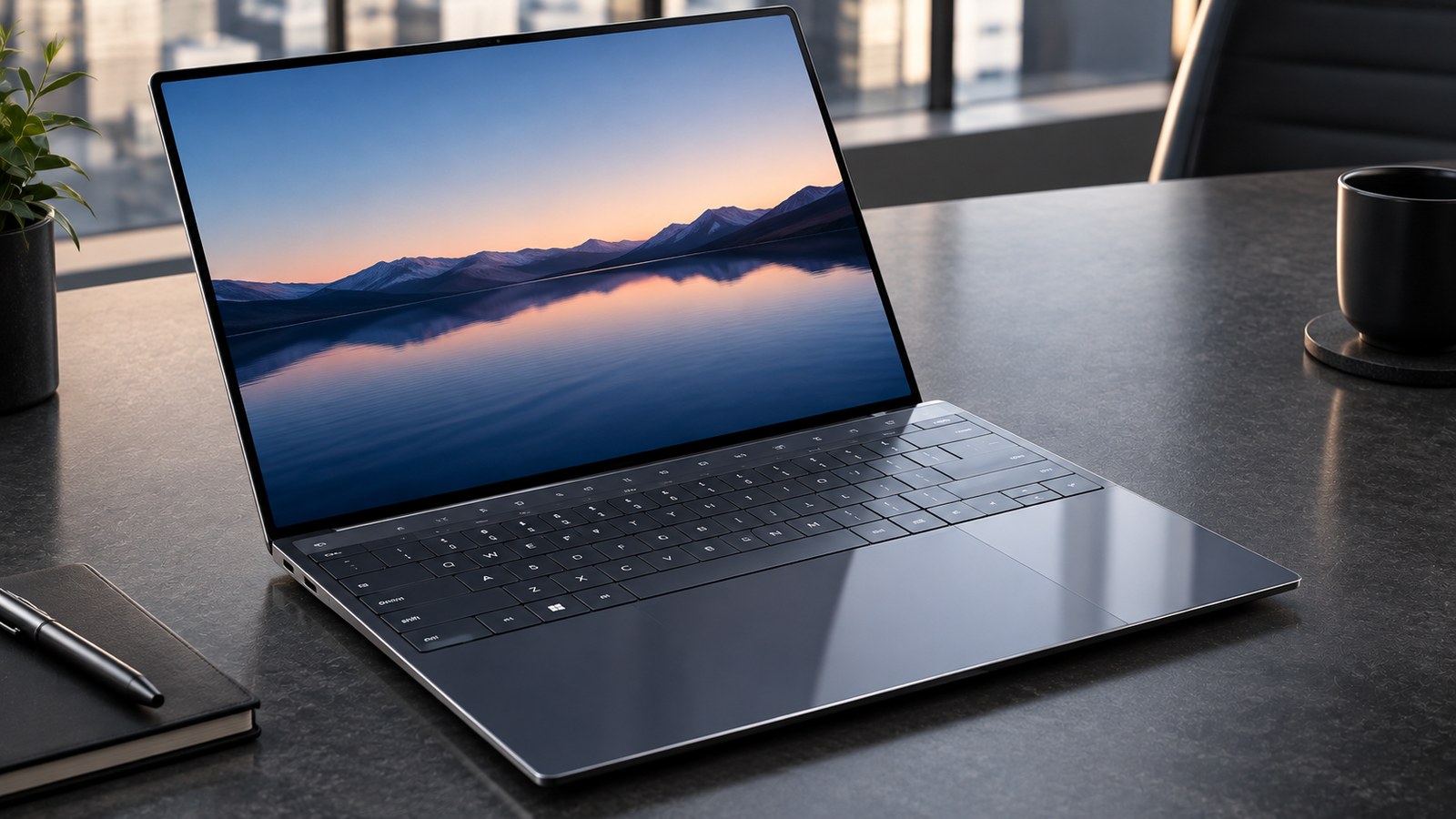
- •Stunning futuristic minimalist design with CNC aluminum body and seamless edge-to-edge glass palm rest
- •Gorgeous 14.5-inch 3.2K 120Hz OLED InfinityEdge display with vibrant color reproduction and deep infinite blacks
- •Excellent sustained productivity performance with Lunar Lake silicon delivering responsive multitasking and cool operation
- •Solid 12.5-hour real-world battery life on web browsing workloads, easily lasting a full workday
- •Includes MicroSD card reader and three full Thunderbolt 4 ports with charging support on both sides
- •Zero-lattice flush keyboard lacks tactile key spacing, resulting in elevated typo rates for blind touch typists
- •Capacitive touch function row lacks physical travel and occasionally misses fast taps during coding sessions
- •Invisible seamless haptic trackpad has no tactile perimeter borders, causing fingers to wander out of the active zone
- •Total omission of legacy USB-A and HDMI ports forces reliance on included adapter dongles
- •At 1.68 kg (3.7 lbs), it is noticeably heavier than competing 14-inch ultrabooks like the MacBook Air or ThinkPad X1
The Dell XPS 14 is one of the most visually daring Windows laptops ever created. Borrowing the radical minimalist design language originally pioneered on the XPS 13 Plus, the XPS 14 features a machined CNC aluminum exterior, a continuous seamless glass palm rest, a capacitive LED function row, and a zero-lattice flush keyboard.
Powered by Intel Lunar Lake Core Ultra processors, it delivers notable leaps in battery efficiency and quiet office operation, paired with an optional 14.5-inch 3.2K 120Hz OLED InfinityEdge display that ranks among the finest screens on any laptop.
However, discussions across Reddit r/Dell, r/laptops, and software engineering communities show that Dell form-over-function decisions introduce polarizing ergonomic hurdles. Here is our detailed review roundup, lab data breakdown, and practical issue guide for the Dell XPS 14.
Key Specifications
The table below outlines the core hardware parameters of the Dell XPS 14:
| Specification | Hardware Parameter |
|---|---|
| Display | 14.5-inch 3.2K InfinityEdge OLED touch (3200 x 2000, 120Hz, 400 nits, Gorilla Glass Victus) |
| Processor | Intel Core Ultra 7 258V / Ultra 9 288V (Lunar Lake architecture, 8 cores) |
| Graphics | Intel Arc 140V integrated graphics (optional NVIDIA GeForce RTX 4050 30W) |
| Memory | 32GB LPDDR5X-8533 onboard RAM |
| Storage | 1TB PCIe 4.0 NVMe M.2 SSD |
| Battery Life | 12 hours and 35 minutes continuous standardized web browsing |
| Dimensions & Weight | 320.0 x 216.0 x 18.0 mm; 1.68 kg (3.70 lbs) |
| Keyboard | Zero-lattice flush keyboard with 1.0mm travel and capacitive LED touch row |
| Trackpad | Seamless glass haptic trackpad with piezo actuators |
| I/O Ports | 3x Thunderbolt 4 (USB-C) with Power Delivery, MicroSD card slot, 3.5mm combo jack |
| Wireless | Intel Wi-Fi 7 (802.11be) + Bluetooth 5.4 |
What the Major Review Outlets Discovered
Hardware testing laboratories praised the XPS 14 for its display fidelity and efficiency while scrutinizing input usability:
1. Breathtaking 3.2K 120Hz OLED Display
In Notebookcheck colorimeter evaluations, the 14.5-inch 3.2K OLED panel achieved 100% DCI-P3 coverage with an outstanding Delta-E color accuracy of 0.9. Peak brightness registered at 395 nits, and the variable 120Hz refresh rate delivers buttery smooth scrolling and window transitions across Windows 11.
2. Lunar Lake Efficiency & Acoustic Discipline
Testing at PCMag verified that the Lunar Lake processor architecture resolves earlier XPS thermal complaints. In typical office multitasking, fan noise remained almost imperceptible at 32 dB. Furthermore, the 69.5Wh battery lasted 12 hours and 35 minutes in standardized web-browsing scripts, comfortably surpassing older 13th and 14th Gen Intel XPS models by over three hours.
3. Polarizing Input Ergonomics
The Verge and Tom's Hardware highlighted that while the seamless glass palm rest looks exquisite, the lack of physical borders around the haptic trackpad causes users to occasionally click dead space. Similarly, typing tests revealed a slight increase in mistypes due to the absence of physical spacing between keys on the zero-lattice keyboard.
Common Problems Reported by Real Buyers on Reddit
Discussions across Reddit r/Dell and programmer forums detail notable day-to-day challenges:
Issue 1: Zero-Lattice Keyboard Typo Rates for Touch Typists
The keys on the XPS 14 are completely flat and sit flush against each other without physical gaps. Touch typists on r/Dell report that without tactile keycap separation, fingers frequently clip adjacent keys during fast typing, increasing typo rates until muscle memory adapts over several weeks.
- The Workaround: Spend time acclimating to the centered hand placement, and enable Windows typing sound feedback or adjust key repeat sensitivity in keyboard settings to verify keystrokes.
Issue 2: Capacitive Touch Function Row Lacks Tactile Feedback
The row above the keyboard replaces physical function keys with illuminated capacitive touch icons that toggle between media controls and F-keys. Software developers who rely heavily on the Esc key in Vim or F-keys in IDE debuggers complain that resting a finger on the row accidentally triggers commands, or rapid taps fail to register.
- The Workaround: Press Fn + Esc to permanently lock the row into traditional F1-F12 and Escape functions. In developer environments, consider remapping the Escape command to the Caps Lock key for tactile reliability.
Issue 3: Seamless Trackpad Boundary Hunting
Because the trackpad is hidden underneath a continuous sheet of frosted glass without raised edges or etched guidelines, users report that when navigating large spreadsheets, their thumbs occasionally drift outside the active haptic area, causing cursor movement to stop.
- The Workaround: Note that the active trackpad zone sits directly beneath the Spacebar, extending approximately 65mm to the left and right. Keeping your thumb centered below the spacebar ensures consistent haptic response.
Issue 4: USB-C Only Connectivity
With no standard USB-A ports or HDMI video outputs, owners must remember to carry adapter dongles when giving presentations or plugging in wireless mouse transceivers.
- The Workaround: Dell includes a small USB-C to USB-A/HDMI multiport adapter in the box. Stashing this adapter inside your laptop bag ensures you are prepared for legacy meeting room equipment.
Who Should Buy It (And Who Should Pass)
Buy the Dell XPS 14 if:
- You love bold modern industrial design: CNC aluminum and borderless glass make this the sleekest Windows laptop on the market.
- You want a gorgeous OLED screen: The 14.5-inch 3.2K 120Hz panel offers unmatched contrast, sharpness, and color depth.
- You need reliable 12-hour battery life: Lunar Lake silicon provides dependable all-day office endurance without fan roar.
Pass on the Dell XPS 14 if:
- You are a software developer who lives on the Escape key: The capacitive touch function row lacks the tactile feedback required for fast code debugging.
- You are a blind touch typist sensitive to flat keys: The zero-lattice keyboard requires a learning curve and may frustrate fast typists.
- You hate carrying adapter dongles: Lack of native USB-A and HDMI ports requires USB-C accessories for everything.
Frequently Asked Questions
Can you feel where the trackpad starts and stops on the XPS 14?
No. The entire palm rest is a single piece of seamless matte Gorilla Glass. While the haptic feedback engine provides satisfying tactile clicks when pressing within the center area, there are no physical grooves or borders indicating the trackpad perimeter.
Is the capacitive function row responsive during coding?
The capacitive touch row responds quickly to individual taps, but because it lacks physical switch travel, programmers using Vim or IDE debuggers often report accidentally missing Esc or F-key presses when touch-typing.
Does the XPS 14 include a USB-A port or HDMI?
No. The chassis features only three Thunderbolt 4 (USB-C) ports, a 3.5mm audio jack, and a MicroSD card slot. Dell bundles a small USB-C to USB-A and HDMI adapter dongle in the box.
How long does the battery last in real-world office work?
Standardized web browsing evaluations conducted by Notebookcheck recorded 12 hours and 35 minutes of continuous runtime on the OLED model, providing dependable full-day battery life away from chargers.
Is the keyboard difficult to get used to?
Touch typists typically require one to two weeks to adapt to the zero-lattice design. Because the keys are completely flat and touch edge-to-edge without gaps, initial typing error rates tend to be higher than on traditional sculpted keyboards.
Sources & Reference Research
- Notebookcheck - Dell XPS 14 Laptop Review: Comprehensive lab benchmarks (12:35 web battery life, 395 nits OLED luminance), color accuracy, and thermal analysis.
- The Verge - Dell XPS 14 Review: Real-world workflow evaluation, capacitive function row critique, and zero-lattice typing speed tests.
- PCMag - Dell XPS 14 (Core Ultra) Review: Lunar Lake performance comparisons, acoustic measurements (32 dB quiet office operation), and battery life tracking.
- Tom's Hardware - Dell XPS 14 Teardown & Benchmarks: Haptic trackpad actuator analysis, 18mm chassis thermal dissipation, and internal hardware inspection.
- Dell Technical Specifications - XPS 14 (9440): Official manufacturer specifications confirming 69.5Wh battery, CNC aluminum materials, 3.2K OLED options, and port configuration.
Synthesized Lab Benchmarks & Accreditations
Every metric above is cross-examined against primary technical documentation and independent acoustic/silicon testing facilities:
The XPS 14 exhibits outstanding chassis rigidity and a mesmerizing 3.2K OLED panel, but its seamless glass palm rest and capacitive row divide users
Dell turned the XPS into a piece of modern art, but sacrificing the physical Escape key and trackpad edges hurts daily usability
Lunar Lake brings impressive battery stamina and quiet fan profiles, though the lack of USB-A requires carrying Dell's included dongle
The seamless glass trackpad haptics feel crisp and satisfying, but you will occasionally click outside the active zone by mistake
XPS 14 specifications confirming CNC aluminum chassis, Gorilla Glass Victus, Intel Core Ultra processors, and 3x Thunderbolt 4 ports
A Gorgeous Futuristic Ultrabook Compromised by Form-Over-Function Input Decisions
The Dell XPS 14 is a visual triumph of modern industrial design, boasting CNC aluminum craftsmanship, a vibrant 3.2K OLED display, and efficient Lunar Lake computing power. However, discussions across Reddit r/Dell and professional developer communities focus heavily on ergonomic friction: the flush zero-lattice keyboard leads to frequent mistypes, the capacitive function row frustrates programmers who rely on physical Esc/F-keys, and the borderless glass trackpad requires visual hunting.
- Design enthusiasts and executives who want the most aesthetically striking, futuristic Windows laptop on the market
- Creative professionals who value a gorgeous 14.5-inch 3.2K 120Hz OLED screen for photo retouching and media consumption
- Users looking for modern Lunar Lake battery efficiency delivering 12-plus hours of reliable unplugged office work
- Buyers comfortable navigating USB-C Thunderbolt 4 ecosystems without needing legacy USB-A ports
- Software developers and Vim/IDE power users who depend heavily on physical Escape and Function keys
- Touch typists who rely on sculpted keycaps and physical spacing between keys for fast, error-free typing
- Users who frequently connect to HDMI conference room projectors or USB-A thumb drives without dongles
- Mobile commuters wanting an ultralight sub-3-pound laptop for daily shoulder bag transport
Frequently Asked Questions
Can you feel where the trackpad starts and stops on the XPS 14?
No. The entire palm rest is a single piece of seamless matte Gorilla Glass. While the haptic feedback engine provides satisfying tactile clicks when pressing within the center area, there are no physical grooves or borders indicating the trackpad perimeter.
Is the capacitive function row responsive during coding?
The capacitive touch row responds quickly to individual taps, but because it lacks physical switch travel, programmers using Vim or IDE debuggers often report accidentally missing Esc or F-key presses when touch-typing.
Does the XPS 14 include a USB-A port or HDMI?
No. The chassis features only three Thunderbolt 4 (USB-C) ports, a 3.5mm audio jack, and a MicroSD card slot. Dell bundles a small USB-C to USB-A and HDMI adapter dongle in the box.
How long does the battery last in real-world office work?
Standardized web browsing evaluations conducted by Notebookcheck recorded 12 hours and 35 minutes of continuous runtime on the OLED model, providing dependable full-day battery life away from chargers.
Is the keyboard difficult to get used to?
Touch typists typically require one to two weeks to adapt to the zero-lattice design. Because the keys are completely flat and touch edge-to-edge without gaps, initial typing error rates tend to be higher than on traditional sculpted keyboards.